|
|||||||||||||||
 |
|
 |
|||||||||||||
 |
|
 |
|||||||||||||
 |
|||||||||||||||
| |
|||||||||||||||
|
|
|
|||||||||||||
|
|
|
|||||||||||||
|
|||||||||||||||
1. Body.2 추가하기
Insert
-> Body
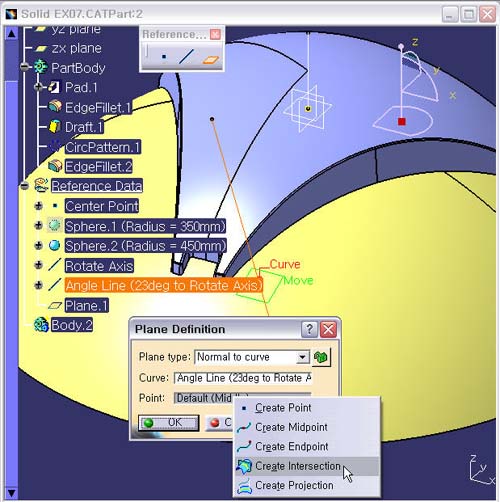
2. Normal Plane 생성하기
Plane
아이콘을 선택한다.
Plane
Type : Normal to curve
Curve
: Angle Line (23deg to Rotate Axis)
Point :
Default에서 마우스 Point를 위치 시키고,
오른쪽
버튼의
Contextual Menu의 Creat Intersection으로
Running
Command로 간다..
Intersection
Definition 창에서 Sphere.2 Surface와
Angle
Line (23deg to Rotate Axis)를 각각 선택 한 후, OK 버튼을
클릭한다
3. Plane Definition 창으로 복귀한다.
4. Preview 버튼을 누른 후, OK 버튼을 클릭한다.
5. Plane.1의 이름을 Normal Plane To Angle Line 으로 수정한다.