1. 작업창을 Generative Shape Design으로 이동한다.
Start -> Shape -> Generative Shape Design
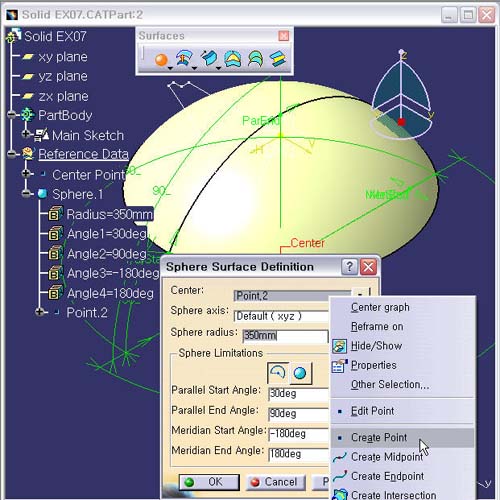
2. Sphere(구) 생성하기
Sphere 아이콘을 선택한다.
Center
: No Selection에서 마우스 Point를 위치 시키고, 오른쪽
버튼의
Contextual Menu의 Creat Point로 Running
Command로
간다.
3. Point 생성 Definition 창에서 Coordination으로
X = 0
Y = 0
Z
= -300 (Sphere.1 의 Center Point 이다.)
OK 버튼을 클릭한다.
4. 다시 Sphere Surface Definition 창으로
돌아 온다.
Sphere Radius : 350mm
Parallel
Start Angle : 30deg
Parallel End Angle : 90deg
Meridian Start Angle : -180deg
Meridian
End Angle : 180deg
위의
값들을 입력 후, Preview 버튼을 클릭 후, OK 확인한다.
5. Sphere.1 Surface의 이름을 Sphere.1 (Radius
= 350mm)로
수정 한다.